
What is B-roll?
B-roll is the extra footage you cut into a video on top of the main shot: the close-ups, cutaways and scenes that show what the speaker is talking about. Here is what it means, how it differs from A-roll, and how to film and use it.
2 videos free to try with AI · Works in your browser · Also on iPhone and Android

B-roll meaning
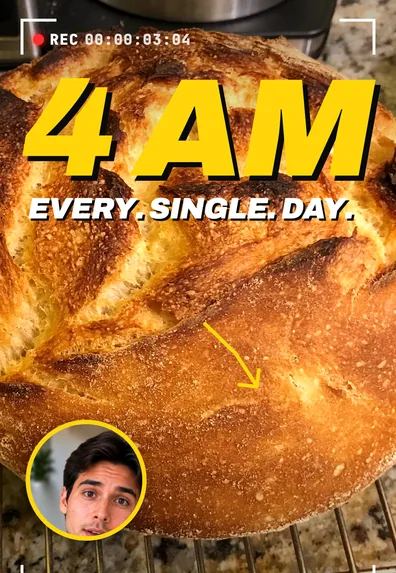
B-roll is secondary footage that plays over or between your main footage. The main footage is called A-roll: in a talking video, that is you speaking to the camera; in a documentary, the interview. B-roll is everything you cut to while the A-roll audio keeps going: your hands chopping onions while you explain a recipe, the street outside while you describe your neighborhood, a screen recording while you explain an app.
The names come from older film and tape editing, when footage was assembled from two separate reels or tapes, an A roll and a B roll, so the editor could switch or dissolve between them. The technology is gone, but the words stuck.
A-roll vs B-roll
| A-roll | B-roll | |
|---|---|---|
| What it is | The main footage that carries the story | Supporting footage cut in on top |
| Sound | Its audio is the main track (your voice) | Usually muted or quiet under the A-roll audio |
| Example | You explaining how you renovated a bathroom | Close-ups of the tiles, the before shot, the tools |
| Without the other | Works, but can feel static | Has no story to follow |
Why B-roll makes videos better
- It shows instead of tells. Saying “the sauce gets thick and glossy” is weaker than showing it.
- It keeps the picture moving. A face on screen for a full minute gets tiring; a cutaway every few sentences resets attention.
- It hides edits. Cutting a pause out of a talking shot creates a jump cut. Laying B-roll over that spot hides the jump completely.
- It adds proof. A before-and-after, a receipt, a result on screen: B-roll makes a claim believable.
20 B-roll shot ideas
Shots that work for almost any video
- Your hands doing the task you are describing.
- An establishing shot of the place: the outside of the shop, the room, the view.
- A slow close-up of the main object, product or tool.
- A screen recording of the app, website or document you mention.
- A photo from your camera roll that matches the story.
- Walking into the location, filmed from behind.
- A detail shot: texture, label, steam, a ticking clock.
- A reaction shot of someone else listening or laughing.
Ideas by niche
- Cooking: ingredients laid out, the pan sizzling, the first bite.
- Real estate: the front door opening, light through windows, a slow pan across the kitchen.
- Fitness: the movement from the side, the weights being set up.
- Beauty: product texture on the back of your hand, the finished look in daylight.
- Coaching and business: your notebook, a whiteboard, a calendar, a client call on screen.
- Travel: signs, food, transport, a map with the route.
- Tech: unboxing, ports and buttons up close, the device in use.
- Home and DIY: before, during and after from the same spot.
- Education: a diagram, a book page, a written formula.
- Pets: the pet doing exactly what you are talking about.
- Fashion: fabric close-ups, a turn in the mirror, details like buttons and seams.
- Small business: packing an order, the workshop, the product on the shelf.
How to film B-roll on your phone
- Hold each shot for five to ten seconds. You will use one to three, but you need room to pick.
- Get three sizes: wide (where we are), medium (what is happening), close (the detail).
- Move slowly or not at all. A steady shot or a slow push looks better than a fast swing.
- Film vertical if the video is for TikTok, Reels or Shorts.
- Film more than you think, right after you record your A-roll, while the setting is the same.
How to edit B-roll in
- Edit the A-roll first. Cut pauses and mistakes so the story is final.
- Mark the words worth showing: objects, places, numbers, results.
- Lay the B-roll on a track above the A-roll, starting on the word it illustrates.
- Keep it short. In short-form video, one to three seconds per cutaway is usually enough.
- Keep your voice playing underneath, and mute or lower the B-roll’s own sound.
Avoid B-roll that doesn’t match the words, endless generic shots, and covering the moment when your face matters most, like a joke or an emotional line. If you use footage you didn’t film, check its license allows your use.
B-roll in SparkRoll
SparkRoll is an AI video editor for talking videos. It adds B-roll from your own photos: pick pictures from your camera roll and say where they go, for example“show my photo of the kitchen when I say renovation”. It never adds stock pictures to your video.
Templates such as Masterclass Cutaways also add graphic cut-aways (steps, diagrams, a calendar) every few seconds, and graphics follow your words, so a price counts up when you say it. Try it on 2 videos free with AI, and read more on the B-roll page or the talking head video editor.
Questions, answered
What does B-roll mean?
B-roll is secondary footage cut over or between the main footage (the A-roll), such as close-ups, cutaways and scenes that show what the speaker is describing.
What is the difference between A-roll and B-roll?
A-roll is the main footage that carries the story and its audio, like a person talking to camera. B-roll is supporting footage laid on top while the A-roll audio continues.
What are examples of B-roll footage?
Hands doing a task, an establishing shot of a place, product close-ups, screen recordings, photos, and reaction shots are all common B-roll.
How long should a B-roll clip be?
In short-form video, usually one to three seconds per cutaway. In longer videos, a few seconds more is fine.
Where can I get B-roll for my videos?
The best B-roll is your own: film it right after you record, or use photos and screen recordings you already have. If you use stock footage, check that its license covers your use.
Ready to edit by talking?
Upload a clip, say what you want, and get a finished edit. 2 videos free to try.
Get the app: App Store · Google Play