
A TikTok video editor you talk to
Film it on your phone, add it to SparkRoll and say what the video needs. It cuts the pauses, puts a hook up front, adds captions on every word and exports a vertical 9:16 video ready to post on TikTok.
2 videos free to try with AI · Works in your browser · Also on Android
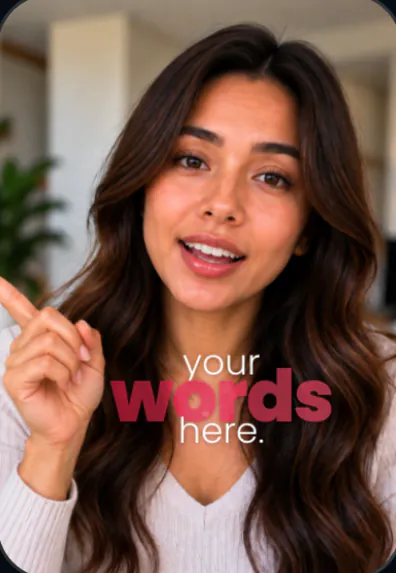
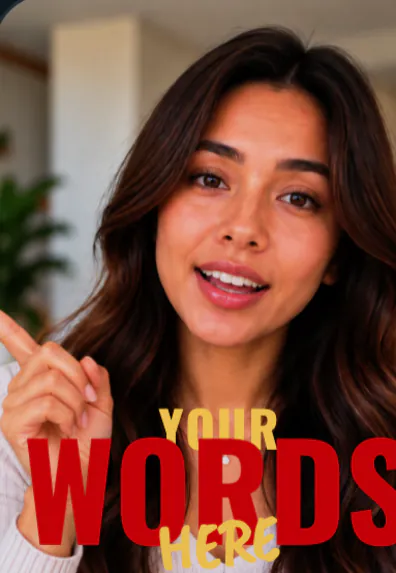
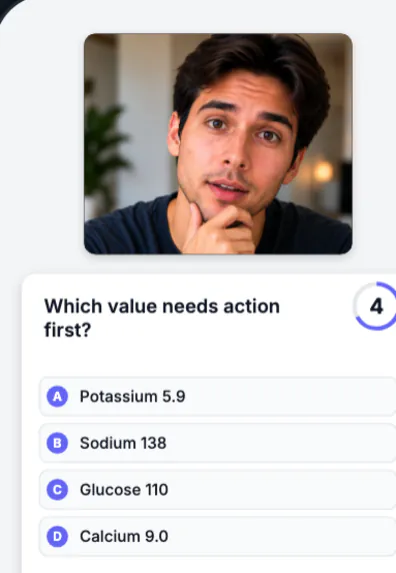
What a TikTok edit needs, in one chat
- A hook first. The first seconds decide whether people stay. Ask for a hook, or let a template set one.
- No dead air. Pauses, filler words and retakes are cut as clean jump cuts.
- Captions on every word, because many people scroll with the sound off. See auto captions.
- A look that feels current. 55 templates: Fly-In, Cinematic Title, Quiz Reveal, Step Slam, Price Drop Sticker and more.
- Music under your voice.
- Vertical 9:16 export, ready to upload.
Formats that work on TikTok
Templates are grouped by the kind of video you are making: Talking head, Walk & talk, How-to, Proof, Shop, Story and Podcast.
- Quiz Reveal: a question card, a countdown, then the answer turns green.
- Step Slam: each step slams in full screen.
- This or That: two names side by side, a cross on one and a tick on the other.
- Day in My Life and Highlight Reel for stories.
- Raw vs Edit to show the before and after.
Then add a signature effect on top, like Word behind you, Orbit or the 9-grid of templates.
How to edit a TikTok with SparkRoll
- Add your clip. MP4 or MOV, up to 10 minutes. Drop in several clips and they become one video.
- Pick a template (or keep Clean up), and add a signature effect if you want one.
- Say or type the edit. Hold to talk, or type it, in any language: “cut the pauses, add captions, make the hook bigger”.
- Fine-tune by hand if you like: tap any caption or sticker to move, resize, rotate, edit or remove it.
- Export a vertical 9:16 video for TikTok, Instagram Reels or YouTube Shorts.
Posting the same video to Reels and Shorts too? The same export works there. See the Reels editor and Shorts editor pages.
Pricing
Try it before you pay: you get 2 videos free to try with AI, with 30 AI messages each. Exporting a finished video needs a plan. Coins pay for AI messages; editing by hand is free.
2 videos to try with AI, 30 AI messages each.
200 coins a week. Export your videos. Cancel any week.
1,000 coins a month. Export. Top up with coin packs.
4,000 coins a month, the stronger AI, +20% on coin packs.
Prices in US dollars, + tax where applicable. Coin packs for plan holders: 300 coins $3.99 · 1,000 coins $9.99.
Questions, answered
Can SparkRoll edit TikTok videos?
Yes. It is made for vertical talking videos and exports 9:16 files ready for TikTok.
Does it add captions and a hook?
Yes. Ask for captions and a hook in your own words, or pick a template that sets them for you.
Can I use it on my phone?
Yes. SparkRoll works in the browser at sparkroll.app, and there is an Android app on Google Play.
Is it free?
You can try 2 videos free with AI. Exporting needs a plan, from $6.99 a week.
More ways to use SparkRoll
- AI video editorChat-based editing for talking videos
- Free AI video editor2 videos free to try with AI
- Edit video by talkingA chat video editor: say the edit
- Auto captionsCaptions on every word, automatically
- Remove pauses & jump cutsAuto-cut pauses, ums and retakes
- Video templatesAll 55 templates and the effects
- Instagram Reels editorTrending looks for Reels
- YouTube Shorts editorCaptions and cuts for Shorts
- Talking head video editorFor face-to-camera videos
- TikTok Shop & UGC editorProduct videos, price stickers, demos
- CapCut alternativeChat editing vs a timeline
Ready to edit by talking?
Upload a clip, say what you want, and get a finished edit. 2 videos free to try.