
A CapCut alternative for when you would rather talk
CapCut is a capable timeline editor. SparkRoll is a different kind of tool: a chat-based AI video editor for talking videos, where you describe the edit instead of building it. Here is an honest look at when each one fits.
2 videos free to try with AI · Works in your browser · Also on Android


Two ways to edit
A timeline editor like CapCut gives you the clips, tracks and tools, and you assemble the edit yourself. That is great when you want frame-level control and enjoy editing.
SparkRoll starts from what you want. You add a clip and say or type the result, and it cuts the pauses, adds captions, a hook, music, a template and effects for you. You can still fine-tune any caption or sticker by hand.
| SparkRoll | A timeline editor | |
|---|---|---|
| How you edit | Talk or type the edit, in any language | Arrange clips and tools on a timeline |
| Pauses and retakes | Cut automatically, every cut listed in Review | Depends on the tools you use |
| Captions, hook, music | Added from one request or one template | Added and styled step by step |
| Best for | Talking videos: talking head, walk & talk, how-to, product | Any edit where you want full manual control |
When SparkRoll is the better fit
- You film yourself talking and want it to look edited, fast.
- You would rather describe the edit than learn a timeline.
- You want pauses and retakes cut, captions and a hook in one go.
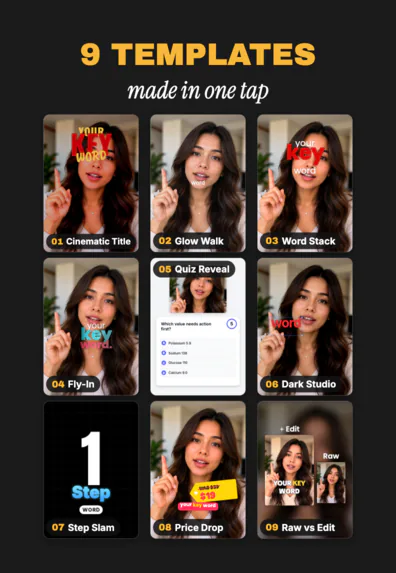
- You want trending looks like Cinematic Title, Fly-In or Word Stack Walk in one tap. See the templates.
When a timeline editor is the better fit
- You are cutting music videos, montages or cinematic B-roll with no talking.
- You want to place every frame yourself.
Many creators use both: SparkRoll for the daily talking videos, a timeline editor for the occasional big project.
Try SparkRoll on your own clip
- Add your clip. MP4 or MOV, up to 10 minutes. Drop in several clips and they become one video.
- Pick a template (or keep Clean up), and add a signature effect if you want one.
- Say or type the edit. Hold to talk, or type it, in any language: “cut the pauses, add captions, make the hook bigger”.
- Fine-tune by hand if you like: tap any caption or sticker to move, resize, rotate, edit or remove it.
- Export a vertical 9:16 video for TikTok, Instagram Reels or YouTube Shorts.
CapCut is a trademark of its owner. SparkRoll is not affiliated with CapCut or ByteDance.
Pricing
Try it before you pay: you get 2 videos free to try with AI, with 30 AI messages each. Exporting a finished video needs a plan. Coins pay for AI messages; editing by hand is free.
2 videos to try with AI, 30 AI messages each.
200 coins a week. Export your videos. Cancel any week.
1,000 coins a month. Export. Top up with coin packs.
4,000 coins a month, the stronger AI, +20% on coin packs.
Prices in US dollars, + tax where applicable. Coin packs for plan holders: 300 coins $3.99 · 1,000 coins $9.99.
Questions, answered
Is SparkRoll like CapCut?
Both edit short videos, but they work differently. CapCut is a timeline editor; SparkRoll is a chat-based AI video editor where you describe the edit and it does it.
Can I move from CapCut to SparkRoll?
Yes. Add the same raw clips to SparkRoll and ask for the edit. Export vertical 9:16 for TikTok, Reels or Shorts.
Is SparkRoll free?
You can try 2 videos free with AI. Exporting needs a plan, from $6.99 a week.
Is SparkRoll made by CapCut?
No. SparkRoll is made by IBEX Solutions LLC and is not affiliated with CapCut or ByteDance.
More ways to use SparkRoll
- AI video editorChat-based editing for talking videos
- Free AI video editor2 videos free to try with AI
- Edit video by talkingA chat video editor: say the edit
- Auto captionsCaptions on every word, automatically
- Remove pauses & jump cutsAuto-cut pauses, ums and retakes
- Video templatesAll 55 templates and the effects
- TikTok video editorVertical edits with a hook up front
- Instagram Reels editorTrending looks for Reels
- YouTube Shorts editorCaptions and cuts for Shorts
- Talking head video editorFor face-to-camera videos
- TikTok Shop & UGC editorProduct videos, price stickers, demos
Ready to edit by talking?
Upload a clip, say what you want, and get a finished edit. 2 videos free to try.