
Product videos for TikTok Shop, edited by talking
When you post product videos every day, editing is the bottleneck. Film once, mistakes and all, then tell SparkRoll what the video needs: clean cuts, captions, a hook and a price sticker that slaps on.
2 videos free to try with AI · Works in your browser · Also on Android

Shop templates
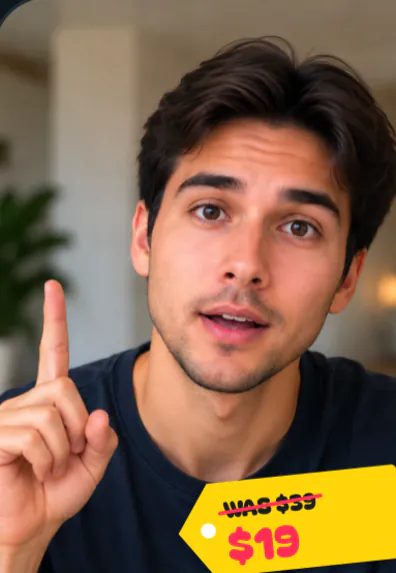
- Price Drop Sticker: a price tag slaps on, the old price struck through, the deal bounces in.
- Product Demo: your product's name and a checklist of what it does.
- Recommend: a paper strip with your line, your picture of it and who made it.
- Spotlight: a brand pill, features in lime serif, your screenshots on a card.
- Testimonial: the line that matters on a white card with your handle.
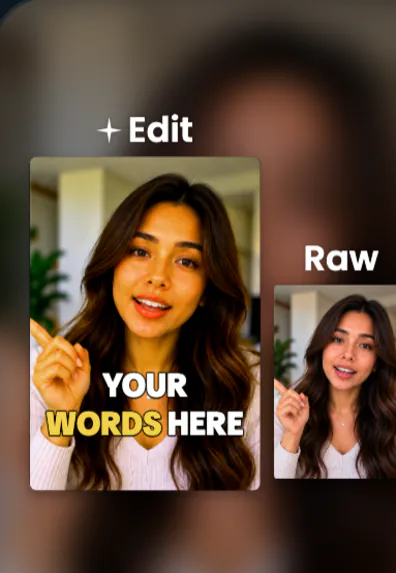
- Before & After and Raw vs Edit for proof.
Requests sellers and UGC creators use
- Clean it up
- Hook: I filmed this once, mistakes and all
- Use Price Drop Sticker
- Captions bold, off my face
- Add music under my voice
Keep talking through mistakes while you film: the clean edit cuts the pauses, filler words and restarts.
Built for a daily posting routine
One take per product. The clean edit handles the stumbles.
The same look every time. Pick a template and reuse it, so your shop has a consistent style.
Your words, your claims. SparkRoll edits what you said; it does not add product claims or generate voices. Check TikTok Shop's content rules for what you say and disclose.
Exports for every platform: vertical 9:16 for TikTok, Reels and Shorts.
- Add your clip. MP4 or MOV, up to 10 minutes. Drop in several clips and they become one video.
- Pick a template (or keep Clean up), and add a signature effect if you want one.
- Say or type the edit. Hold to talk, or type it, in any language: “cut the pauses, add captions, make the hook bigger”.
- Fine-tune by hand if you like: tap any caption or sticker to move, resize, rotate, edit or remove it.
- Export a vertical 9:16 video for TikTok, Instagram Reels or YouTube Shorts.
Pricing
Try it before you pay: you get 2 videos free to try with AI, with 30 AI messages each. Exporting a finished video needs a plan. Coins pay for AI messages; editing by hand is free.
2 videos to try with AI, 30 AI messages each.
200 coins a week. Export your videos. Cancel any week.
1,000 coins a month. Export. Top up with coin packs.
4,000 coins a month, the stronger AI, +20% on coin packs.
Prices in US dollars, + tax where applicable. Coin packs for plan holders: 300 coins $3.99 · 1,000 coins $9.99.
Questions, answered
Can I edit TikTok Shop videos with SparkRoll?
Yes. It has shop templates like Price Drop Sticker, Product Demo and Recommend, and exports vertical 9:16 videos.
Is it good for UGC creators?
It is made for talking videos filmed on a phone, which is what most UGC is: cuts, captions, hooks and product templates in one chat.
Does SparkRoll follow TikTok Shop rules for me?
No. SparkRoll edits video. What you say about a product and your disclosures are up to you, so check TikTok Shop’s content policies.
How many videos can I make?
It depends on your coins. Each AI message costs at least 1 coin and editing by hand is free. Plans include 200 to 4,000 coins.
More ways to use SparkRoll
- AI video editorChat-based editing for talking videos
- Free AI video editor2 videos free to try with AI
- Edit video by talkingA chat video editor: say the edit
- Auto captionsCaptions on every word, automatically
- Remove pauses & jump cutsAuto-cut pauses, ums and retakes
- Video templatesAll 55 templates and the effects
- TikTok video editorVertical edits with a hook up front
- Instagram Reels editorTrending looks for Reels
- YouTube Shorts editorCaptions and cuts for Shorts
- Talking head video editorFor face-to-camera videos
- CapCut alternativeChat editing vs a timeline
Ready to edit by talking?
Upload a clip, say what you want, and get a finished edit. 2 videos free to try.