
A VEED alternative for when you would rather say it
VEED is an online video editor with a timeline and many AI tools. SparkRoll also works in your browser, but it is built only for talking videos and you edit by chat. Here is an honest look at when each one fits.
2 videos free to try with AI · Works in your browser · Also on iPhone and Android

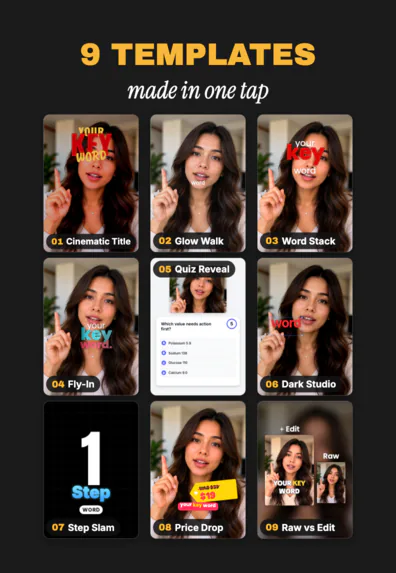

Two ways to edit in the browser
A browser timeline editor like VEED gives you tracks, tools and templates, and you put the edit together yourself. That is great for many kinds of video, including long ones.
SparkRoll does one job: making talking videos look edited. You add a clip and say the result, and it cuts the pauses, adds captions, a hook, music and a template. Your video is cut in your browser; only the sound goes to SparkRoll, to hear the words.
| SparkRoll | A browser timeline editor | |
|---|---|---|
| How you edit | Talk or type the edit, in any language | Arrange clips and tools on a timeline |
| Pauses and retakes | Cut automatically, every cut listed in Review | Depends on the tools you use |
| Captions, hook, music | Added from one request or one template | Added and styled step by step |
| Where | Browser, iPhone and Android apps | Mostly the browser |
| Best for | Talking videos for TikTok, Reels and Shorts | Many kinds of video, including long and 16:9 |
When SparkRoll is the better fit
- You film yourself talking and post vertical videos.
- You would rather describe the edit than build it on a timeline.
- You want the same edit on your phone too, with the iPhone app or Android app.
When a browser timeline editor may fit better
- You edit long or 16:9 videos, slideshows or screen recordings without talking.
- You want to place every clip and frame yourself.
Many creators use both: SparkRoll for the daily talking videos, a timeline editor for the bigger projects.
Try SparkRoll on your own clip
- Add your clip. MP4 or MOV, up to 10 minutes. Drop in several clips and they become one video.
- Pick a template (or keep Clean up), and add a signature effect if you want one.
- Say or type the edit. Tap to talk, or type it, in any language: “cut the pauses, add captions, make the hook bigger”.
- Fine-tune by hand if you like: tap any caption or sticker to move, resize, rotate, edit or remove it.
- Export a vertical 9:16 video for TikTok, Instagram Reels or YouTube Shorts.
VEED is a trademark of its owner. SparkRoll is not affiliated with VEED.
Pricing
Try it before you pay: you get 2 videos free to try with AI, with 30 AI messages each. Exporting a finished video needs a plan. Coins pay for AI messages; editing by hand is free.
2 videos to try with AI, 30 AI messages each.
250 coins a week. Export your videos. Cancel any week.
1,000 coins a month. Export. Top up with coin packs.
3,000 coins a month, the stronger AI, +20% on coin packs.
Prices in US dollars, + tax where applicable. Coin packs for plan holders: 300 coins $3.99 · 1,000 coins $9.99.
Questions, answered
Is SparkRoll like VEED?
Both work in the browser. VEED is a timeline editor with AI tools; SparkRoll is a chat-based AI video editor for talking videos where you describe the edit and it does it.
Can I move from VEED to SparkRoll?
Yes. Add the same raw clips to SparkRoll and ask for the edit. Export vertical 9:16 for TikTok, Reels or Shorts.
Is SparkRoll free?
You can try 2 videos free with AI. Exporting needs a plan, from $8.99 a week.
Is SparkRoll made by VEED?
No. SparkRoll is made by IBEX Solutions LLC and is not affiliated with VEED.
More ways to use SparkRoll
- AI video editorChat-based editing for talking videos
- Free AI video editor2 videos free to try with AI
- Edit video by talkingA chat video editor: say the edit
- Auto captionsCaptions on every word, automatically
- Remove pauses & jump cutsAuto-cut pauses, ums and retakes
- Video templatesAll 55 templates and the effects
- TikTok video editorVertical edits with a hook up front
- Instagram Reels editorTrending looks for Reels
- YouTube Shorts editorCaptions and cuts for Shorts
- Talking head video editorFor face-to-camera videos
- TikTok Shop & UGC editorProduct videos, price stickers, demos
- CapCut alternativeChat editing vs a timeline
- Captions app alternativeEdit by chat instead of tool by tool
Ready to edit by talking?
Upload a clip, say what you want, and get a finished edit. 2 videos free to try.